Exam Information
Overview
Find information about the current semester's exam schedule, computer-based exam instructions and anonymous exam numbers for students on this page.
| Date | Time | Course | Professor | Room | Alt room |
|---|---|---|---|---|---|
| Monday, December 7 | |||||
| Monday, December 7 | 9:00–11:00 | Accounting for Lawyers | Phillips, A | 106 | |
| Monday, December 7 | 9:00–12:00 | Federal Courts and the Federal System | Brett | 104 | |
| Monday, December 7 | 9:00–11:00 | Juvenile Law | Schnug | 129 | |
| Monday, December 7 | 9:30-11:35 | Arbitration | Ware | 107 | |
| Tuesday, December 8 | |||||
| Tuesday, December 8 | 9:00–11:00 | Consumer Law | Witherspoon | 129 | |
| Tuesday, December 8 | 9:00–1:00 | Federal Income Taxation | Mazza | 104 | 107 |
| Wednesday, December 9 | |||||
| Wednesday, December 9 | 9:00–12:00 | Civil Procedure | Brett | 104 | 108 |
| Wednesday, December 9 | 9:00–12:00 | Civil Procedure | Craig | 106 | |
| Wednesday, December 9 | 9:00–12:00 | Civil Procedure | Harrison | 129 | |
| Wednesday, December 9 | 9:00–12:00 | Civil Procedure | Hines | 107 | |
| Wednesday, December 9 | 2:00–5:00 | Business Organizations | Perkins | 104 | 107 |
| Wednesday, December 9 | 2:00-5:00 | Administrative Law | Rubenstein | 106 | |
| Thursday, December 10 | |||||
| Thursday, December 10 | 9:00–12:00 | Civil Rights Actions | McAllister | 106 | |
| Thursday, December 10 | 9:00–12:00 | Media and the First Amendment | Johnson | 107 | |
| Thursday, December 10 | 9:00–11:00 | Professional Responsibility | Jewell | 104 | 129 |
| Friday, December 11 | |||||
| Friday, December 11 | 9:00–12:00 | Criminal Procedure: Adjudication | Cateforis | 104 | |
| Friday, December 11 | 9:00–12:00 | Employment Law | Rosenberg | 106 | |
| Friday, December 11 | 9:00–12:00 | International Trade Law | Bhala | Online | |
| Friday, December 11 | 9:00–11:00 | Introduction to Elder Law | Reaves | 109 | |
| Friday, December 11 | 9:00–1:00 | Jurisdiction | Six | 107 | |
| Monday, December 14 | |||||
| Monday, December 14 | 9:00–12:00 | Contracts | Korzun | 106 | |
| Monday, December 14 | 9:30–12:30 | Contracts | Ware | 107 | |
| Monday, December 14 | 9:00–1:00 | Contracts | Platt | 104 | 129 |
| Monday, December 14 | 2:00–5:00 | Immigration Law | Jeppsen Soo | 129 | |
| Monday, December 14 | 2:00–5:00 | Special Topics: Sentencing | Steefel | 107 | |
| Tuesday, December 15 | |||||
| Tuesday, December 15 | 9:00–12:00 | Evidence | Velte | 104 | 107 |
| Wednesday, December 16 | |||||
| Wednesday, December 16 | 9:00–11:00 | Nonprofit and Tax-Exempt Organizations | Tyler | 107 | |
| Wednesday, December 16 | 9:00–12:00 | State Court Practice | Roberts | 106 | |
| Thursday, December 17 | |||||
| Thursday, December 17 | 9:00–12:00 | Criminal Procedure: Investigation | Phillips | 104 | 108 |
| Thursday, December 17 | 9:00–12:00 | Energy Law and Policy | Outka | 106 | |
| Thursday, December 17 | 9:00–12:00 | Remedies | Hines | 107 | |
| Friday, December 18 | |||||
| Friday, December 18 | 9:00–12:00 | Torts I | McAllister | 104 | 107 |
| Friday, December 18 | 9:00–1:00 | Torts I | Velte | 106 | 129 |
| Friday, December 18 | 2:00–4:00 | Employment Discrimination Law | Lawrence | 104 | |
| Friday, December 18 | 2:00–4:00 | Estate Planning: Principles | Bailes | 106 | |
| Dec 18–21 | 1L Diagnostic Test | Terranova | Online | ||
| Take Home Exams | |||||
| Public International Law | Korzun | Take home exam | |||
| Date | Time | Course | Professor | Room | Alt Room |
|---|---|---|---|---|---|
| Monday, April 26 | |||||
| Monday, April 26 | 9:00-12:00 | Corporate Finance | Perkins |
| |
| Monday, April 26 | 9:00-12:00 | Criminal Procedure: Investigation | Yung | ||
| Monday, April 26 | 9:00-12:00 | Intro to Employee Benefits | Lattan |
| |
| Tuesday, April 27 | |||||
| Tuesday, April 27 | 9:00-12:00 | Lawyering Skills II (Group 1) | Lattan, Rosenberg & Keller | ||
| Tuesday, April 27 | 9:00-12:00 | Lawyering Skills II (Group 2) | Carter & Six | ||
| Tuesday, April 27 | 9:30-11:30 | Bankruptcy | Ware |
| |
| Tuesday, April 27 | 9:00-12:00 | Environmental Law | Outka |
| |
| Wednesday, April 28 | |||||
| Wednesday, April 28 | 9:00-11:00 | Special Topics: Secured Trans | Baran |
| |
| Wednesday, April 28 | 9:00-12:00 | State Constitutional Law | McAllister |
| |
| Wednesday, April 28 | 9:00-12:00 | Toxic Torts | Craig | ||
| Thursday, April 29 | |||||
| Thursday, April 29 | 9:00-12:00 | Complex Litigations | Hines | ||
| Thursday, April 29 | 9:00-12:00 | Evidence | Brett | ||
| Thursday, April 29 | 9:00-12:00 | Intl Commerce and Investment | Korzun |
| |
| Friday, April 30 | |||||
| Friday, April 30 | 9:00-1:00 | Property | Outka | ||
| Friday, April 30 | 9:00-1:00 | Property | Jefferson | ||
| Friday, April 30 | 9:00-12:00 | Mergers and Other Acquisitions | Mikkelson | ||
| Friday, April 30 | 9:00-11:00 | Oil and Gas | Stanley; Steincamp | ||
| Monday, May 3 | |||||
| Monday, May 3 | 9:00-12:00 | Elections and Campaign Finance | Johnson | ||
| Monday, May 3 | 9:00-11:00 | Professional Responsibility | Richmond | ||
| Monday, May 3 | 9:00-12:00 | Trusts and Estates | Markley |
| |
| Monday, May 3 | 9:00-12:00 | Water Law | Craig |
| |
| Tuesday, May 4 | |||||
| Tuesday, May 4 | 9:00-12:00 | Criminal Law | Steefel | ||
| Tuesday, May 4 | 9:00-12:00 | Criminal Law | Yung | ||
| Tuesday, May 4 | 9:00-11:00 | Labor Law | Lawrence | ||
| Tuesday, May 4 | 9:00-12:00 | Taxation of Business Enterprises | Mazza |
| |
| Wednesday, May 5 | |||||
| Wednesday, May 5 | 9:00-12:00 | Family Law | Daily | ||
| Wednesday, May 5 | 9:00-12:00 | Jurisdiction | Hines | ||
| Thursday, May 6 | |||||
| Thursday, May 6 | 9:00-1:00 | Business Organizations | Platt | ||
| Thursday, May 6 | 9:00-11:00 | Patent Practice | Cook | ||
| Thursday, May 6 | 9:00-11:00 | Renewable Energy Law Practice | Anderson; Hagedorn |
| |
| Friday, May 7 | |||||
| Friday, May 7 | 9:00-12:00 | Intro Constitutional Law | McAllister | ||
| Friday, May 7 | 9:00-12:00 | Intro Constitutional Law | Rubenstein | ||
| Friday, May 7 | 9:00-11:00 | Real Estate Finance | Hickey |
| |
| Friday, May 7-Monday, May 10 | |||||
| May 7-10 | 1L Diagnostic test | Terranova | Online | ||
| Date | Time | Course | Professor | Room | Alt room |
|---|---|---|---|---|---|
| Monday, December 7 | |||||
| Monday, December 7 | 9:00–11:00 | Accounting for Lawyers | Phillips, A | 106 | |
| Monday, December 7 | 9:00–12:00 | Federal Courts and the Federal System | Brett | 104 | |
| Monday, December 7 | 9:00–11:00 | Juvenile Law | Schnug | 129 | |
| Monday, December 7 | 9:30-11:35 | Arbitration | Ware | 107 | |
| Tuesday, December 8 | |||||
| Tuesday, December 8 | 9:00–11:00 | Consumer Law | Witherspoon | 129 | |
| Tuesday, December 8 | 9:00–1:00 | Federal Income Taxation | Mazza | 104 | 107 |
| Wednesday, December 9 | |||||
| Wednesday, December 9 | 9:00–12:00 | Civil Procedure | Brett | 104 | 108 |
| Wednesday, December 9 | 9:00–12:00 | Civil Procedure | Craig | 106 | |
| Wednesday, December 9 | 9:00–12:00 | Civil Procedure | Harrison | 129 | |
| Wednesday, December 9 | 9:00–12:00 | Civil Procedure | Hines | 107 | |
| Wednesday, December 9 | 2:00–5:00 | Business Organizations | Perkins | 104 | 107 |
| Wednesday, December 9 | 2:00-5:00 | Administrative Law | Rubenstein | 106 | |
| Thursday, December 10 | |||||
| Thursday, December 10 | 9:00–12:00 | Civil Rights Actions | McAllister | 106 | |
| Thursday, December 10 | 9:00–12:00 | Media and the First Amendment | Johnson | 107 | |
| Thursday, December 10 | 9:00–11:00 | Professional Responsibility | Jewell | 104 | 129 |
| Friday, December 11 | |||||
| Friday, December 11 | 9:00–12:00 | Criminal Procedure: Adjudication | Cateforis | 104 | |
| Friday, December 11 | 9:00–12:00 | Employment Law | Rosenberg | 106 | |
| Friday, December 11 | 9:00–12:00 | International Trade Law | Bhala | Online | |
| Friday, December 11 | 9:00–11:00 | Introduction to Elder Law | Reaves | 109 | |
| Friday, December 11 | 9:00–1:00 | Jurisdiction | Six | 107 | |
| Monday, December 14 | |||||
| Monday, December 14 | 9:00–12:00 | Contracts | Korzun | 106 | |
| Monday, December 14 | 9:30–12:30 | Contracts | Ware | 107 | |
| Monday, December 14 | 9:00–1:00 | Contracts | Platt | 104 | 129 |
| Monday, December 14 | 2:00–5:00 | Immigration Law | Jeppsen Soo | 129 | |
| Monday, December 14 | 2:00–5:00 | Special Topics: Sentencing | Steefel | 107 | |
| Tuesday, December 15 | |||||
| Tuesday, December 15 | 9:00–12:00 | Evidence | Velte | 104 | 107 |
| Wednesday, December 16 | |||||
| Wednesday, December 16 | 9:00–11:00 | Nonprofit and Tax-Exempt Organizations | Tyler | 107 | |
| Wednesday, December 16 | 9:00–12:00 | State Court Practice | Roberts | 106 | |
| Thursday, December 17 | |||||
| Thursday, December 17 | 9:00–12:00 | Criminal Procedure: Investigation | Phillips | 104 | 108 |
| Thursday, December 17 | 9:00–12:00 | Energy Law and Policy | Outka | 106 | |
| Thursday, December 17 | 9:00–12:00 | Remedies | Hines | 107 | |
| Friday, December 18 | |||||
| Friday, December 18 | 9:00–12:00 | Torts I | McAllister | 104 | 107 |
| Friday, December 18 | 9:00–1:00 | Torts I | Velte | 106 | 129 |
| Friday, December 18 | 2:00–4:00 | Employment Discrimination Law | Lawrence | 104 | |
| Friday, December 18 | 2:00–4:00 | Estate Planning: Principles | Bailes | 106 | |
| Dec 18–21 | 1L Diagnostic Test | Terranova | Online | ||
| Take Home Exams | |||||
| Public International Law | Korzun | Take home exam | |||
| Date | Time | Course | Professor | Room | Alt Room |
|---|---|---|---|---|---|
| Monday, April 26 | |||||
| Monday, April 26 | 9:00-12:00 | Corporate Finance | Perkins |
| |
| Monday, April 26 | 9:00-12:00 | Criminal Procedure: Investigation | Yung | ||
| Monday, April 26 | 9:00-12:00 | Intro to Employee Benefits | Lattan |
| |
| Tuesday, April 27 | |||||
| Tuesday, April 27 | 9:00-12:00 | Lawyering Skills II (Group 1) | Lattan, Rosenberg & Keller | ||
| Tuesday, April 27 | 9:00-12:00 | Lawyering Skills II (Group 2) | Carter & Six | ||
| Tuesday, April 27 | 9:30-11:30 | Bankruptcy | Ware |
| |
| Tuesday, April 27 | 9:00-12:00 | Environmental Law | Outka |
| |
| Wednesday, April 28 | |||||
| Wednesday, April 28 | 9:00-11:00 | Special Topics: Secured Trans | Baran |
| |
| Wednesday, April 28 | 9:00-12:00 | State Constitutional Law | McAllister |
| |
| Wednesday, April 28 | 9:00-12:00 | Toxic Torts | Craig | ||
| Thursday, April 29 | |||||
| Thursday, April 29 | 9:00-12:00 | Complex Litigations | Hines | ||
| Thursday, April 29 | 9:00-12:00 | Evidence | Brett | ||
| Thursday, April 29 | 9:00-12:00 | Intl Commerce and Investment | Korzun |
| |
| Friday, April 30 | |||||
| Friday, April 30 | 9:00-1:00 | Property | Outka | ||
| Friday, April 30 | 9:00-1:00 | Property | Jefferson | ||
| Friday, April 30 | 9:00-12:00 | Mergers and Other Acquisitions | Mikkelson | ||
| Friday, April 30 | 9:00-11:00 | Oil and Gas | Stanley; Steincamp | ||
| Monday, May 3 | |||||
| Monday, May 3 | 9:00-12:00 | Elections and Campaign Finance | Johnson | ||
| Monday, May 3 | 9:00-11:00 | Professional Responsibility | Richmond | ||
| Monday, May 3 | 9:00-12:00 | Trusts and Estates | Markley |
| |
| Monday, May 3 | 9:00-12:00 | Water Law | Craig |
| |
| Tuesday, May 4 | |||||
| Tuesday, May 4 | 9:00-12:00 | Criminal Law | Steefel | ||
| Tuesday, May 4 | 9:00-12:00 | Criminal Law | Yung | ||
| Tuesday, May 4 | 9:00-11:00 | Labor Law | Lawrence | ||
| Tuesday, May 4 | 9:00-12:00 | Taxation of Business Enterprises | Mazza |
| |
| Wednesday, May 5 | |||||
| Wednesday, May 5 | 9:00-12:00 | Family Law | Daily | ||
| Wednesday, May 5 | 9:00-12:00 | Jurisdiction | Hines | ||
| Thursday, May 6 | |||||
| Thursday, May 6 | 9:00-1:00 | Business Organizations | Platt | ||
| Thursday, May 6 | 9:00-11:00 | Patent Practice | Cook | ||
| Thursday, May 6 | 9:00-11:00 | Renewable Energy Law Practice | Anderson; Hagedorn |
| |
| Friday, May 7 | |||||
| Friday, May 7 | 9:00-12:00 | Intro Constitutional Law | McAllister | ||
| Friday, May 7 | 9:00-12:00 | Intro Constitutional Law | Rubenstein | ||
| Friday, May 7 | 9:00-11:00 | Real Estate Finance | Hickey |
| |
| Friday, May 7-Monday, May 10 | |||||
| May 7-10 | 1L Diagnostic test | Terranova | Online | ||
Exam Instructions
Find more information about preparing to take computer-based exams in the dropdown below. Before exams:
- Retrieve your anonymous ID number on any LAW CANVAS course.
- Install the current version of Exam4 Software
- Provide your name and email address and select the version of Exam4 which is compatible with your computer. Download the installation file to your computer and install the new version.
- Submit a practice exam
- Submit a practice exam well in advance to help ensure that the software is working properly on your laptop. Additional instructions are in the dropdown menu below.
Important exam reminders:
- Sign in and identify the method in which you are taking the exam, bluebook or laptop.
- You can only take a final with your laptop if an instructor allows you to do so.
- You must install the current version of the Exam4 software.
- Submit a practice exam before your first final. This verifies that your laptop can be used for the exams.
- Bring bluebooks in case your laptop experiences problems during exam.
- Connect to the JAYHAWK Wireless Network and not to the KUGUEST network.
- Unless your instructor says so, start the exam software in closed mode.
- Bring a power adapter and plug in your laptop.
- Verify that your laptop is not set to go into hibernate or other power save modes after some period of inactivity.
Computer-Based Exam Information
You may take your exam on your laptop only if your instructor allows you to do so. Please bring bluebooks even if you plan on taking the test on a laptop. If your laptop fails in the middle of the exam and the problem cannot be rectified quickly, you will be expected to continue the rest of the exam on a bluebook. Please read through the steps carefully if you plan on taking a final on your laptop.
To take a final on your laptop follow the following steps:
- Install the Exam4 Software on your laptop:
- You will need the current version of Exam4. It is available for download here; you may also download it from Exam 4 website.
- You will need to provide your name and email address and select the version of Exam4 which is compatible with your laptop.
- Download the installation file on your computer and double click on it to install the new version.
- Take a practice test on your laptop
Follow these step-by-step instructions to submit a practice exam:
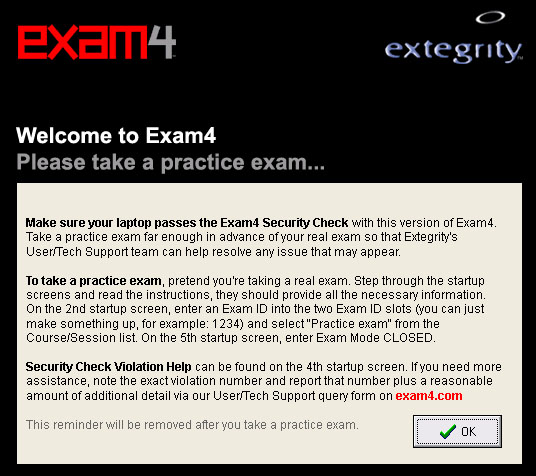
This screen will pop up until you submit a practice test.
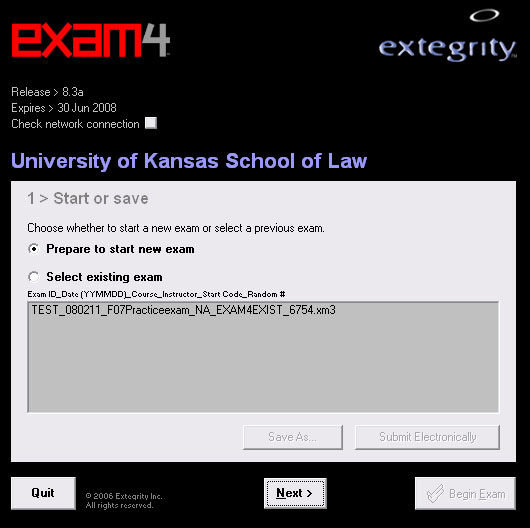
Select "Prepare to start new exam." You may see copies of exams from previous semesters listed.
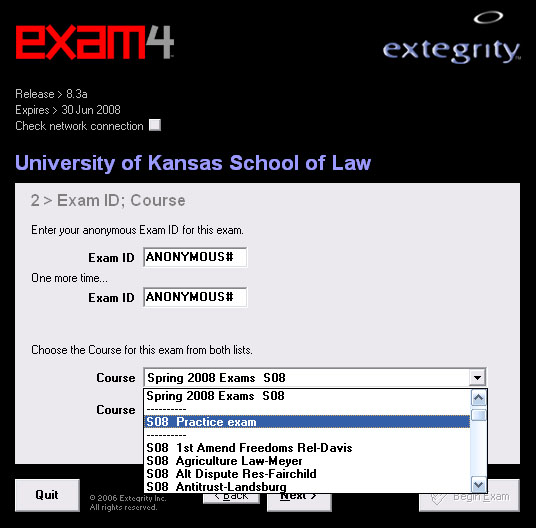
Please use the appropriate Anonymous ID in the Exam ID field so it is possible to determine who submitted an exam.
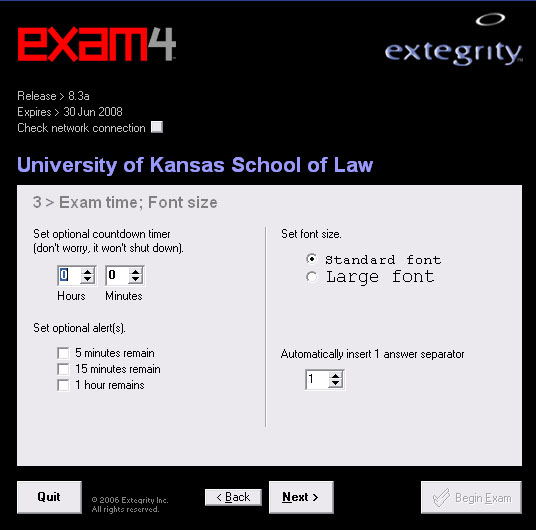
You may choose to have the software countdown your remaining time or alert you when you have a specified amount of time remaining. All choices on this page are entirely optional. The software will not shut down when the timer runs out.
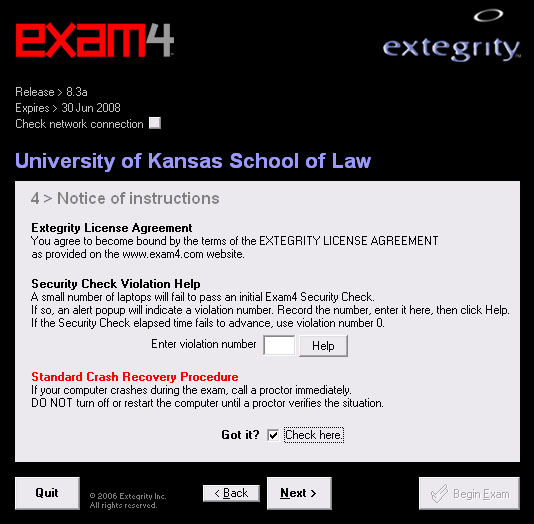
If your computer fails the security check, it will inform you of a violation number to enter on this screen. You should leave this blank by default.
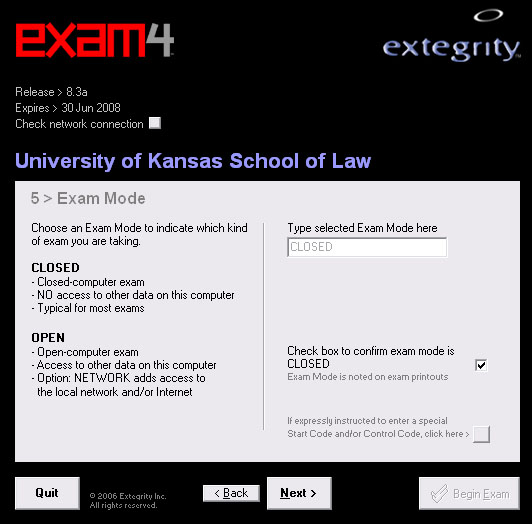
You should submit a practice exam in "CLOSED" mode to ensure your computer passes the security check. You should assume you will take your exam in CLOSED mode unless your instructor tells you otherwise.
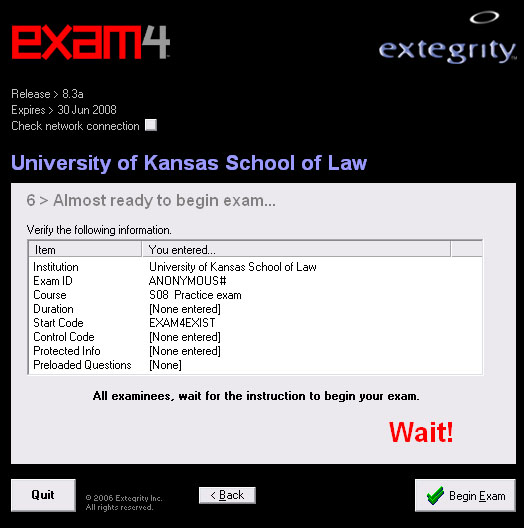
In the actual exam, your instructor will tell you when to begin. You should wait at this screen for their instructions.
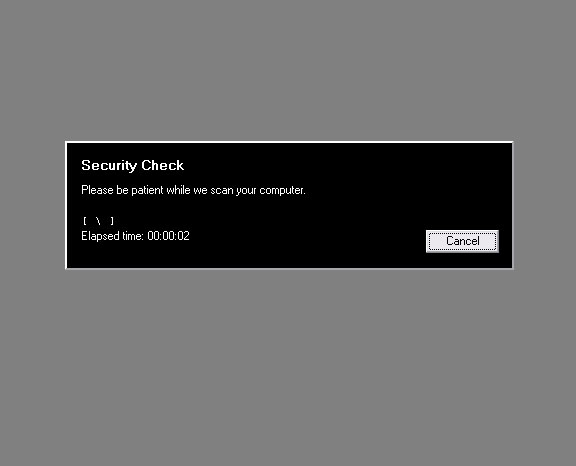
The security check can take up to several minutes. You can use this time to look over your exam.
Please take a few minutes to become familiar with the software during your practice exam. Exam4 does include a spell checker as well as some basic word processing functions.
Note the meter on top right hand side. Exam4 saves automatically every 10 seconds, and makes an additional separate backup every five minutes. The gray bar increments indicate incremental saves and the green bar indicates time until a backup copy is made. You can also make an extra backup copy at any time using the "Save" menu.
Choose "End Exam" when you are finished. You will be prompted to confirm. Choose "Submit Electronically."
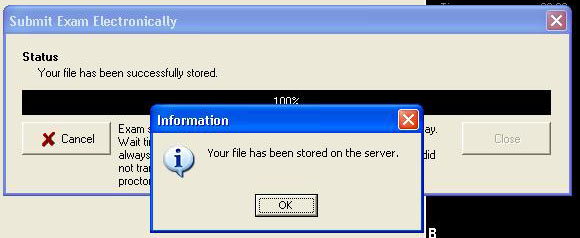
Once your practice exam has been successfully submitted, you should see this screen. You do not need to do anything else, your exam has been stored on the server and you should be ready to use the software on final exams.
However, if your computer configuration changes, for example you switch laptops, or you are borrowing a friend's laptop, or you install a new program, you should submit another practice exam.
If I installed Exam4 last semester, do I need to install it again?
Yes. You need to download and install the newest version every semester.
I'm borrowing a laptop and have already submitted a practice exam. Do I need to submit another?
Yes. You should submit another practice exam to make sure the computer you will be using passes the security check.
What happens if my computer crashes?
Exam4 saves a local copy every 10 seconds. Unless your hard drive has completely failed, it is possible to retrieve that backup. We recommend that you bring bluebooks as well so if your machine does fail, you will not lose time.
What should I do if I have a problem during the exam?
- Option 1: You can start writing the rest of the answers on a bluebook. After the exam, alert IT about the problem. Do not inform your instructor as it will hinder anonymity.
- Option 2: There will be an IT support technician in Green Hall to assist you during the exam. More details will be sent out by email before the exam period. Your instructor decides whether you get extra time for a computer problem. If the problem cannot be resolved in a few minutes we suggest you start writing the rest on a bluebook.
- Have you received your anonymous ID?
- Have you downloaded and installed Exam4?
- Have you successfully submitted a practice exam?
- Are you aware of the policies regarding machine failure?
- Do you have bluebooks ready in case your computer crashes in the middle of an exam?
- Are you aware that you must sign in before every exam?
- Are you familiar with the 99% submission error and how to prevent/fix it?
- If you can answer affirmatively to the above questions, you should be prepared to use Exam4 for your final exams this semester.
For more information, contact:
IT Support
785-864-0636
Room 123 Green Hall
greenhallit@ku.edu
